
Download WinSCP Portable – Secure FTP, SFTP, SCP File Transfer Tool
Overview
WinSCP Portable is a mobile-compatible FTP client designed for secure file transfers to remote servers via SSH, SCP, and SFTP protocols. It serves as a reliable utility for users who require encrypted data transmission between local devices and remote systems. The app is particularly valuable for developers, system administrators, and IT professionals managing files across distributed environments. Its core purpose lies in enabling secure, efficient, and consistent file operations without compromising data integrity or confidentiality.
By leveraging industry-standard encryption protocols, WinSCP Portable ensures that sensitive files—such as configuration scripts, databases, and deployment packages—are transferred safely over untrusted networks. This makes it an essential tool in environments where data security is paramount. The application’s portable nature allows users to carry their entire configuration and session history on a USB drive or portable storage, enabling seamless work across multiple devices without installation or system-level changes.
Although the developer did not provide additional technical details about the origin or background of the app, its functionality aligns with established standards in secure file transfer utilities. Real-world use cases include remote server maintenance, automated deployment workflows, and secure backup operations. In the broader mobile app ecosystem, WinSCP Portable fills a niche for lightweight, secure, and portable tools tailored to technical users who demand reliability and consistency across platforms.
Key Features & Functionality
- Secure Transfers via SCP and SFTP: WinSCP Portable uses encrypted protocols to protect data during transmission, preventing eavesdropping and tampering. This is critical when transferring sensitive files over public or shared networks.
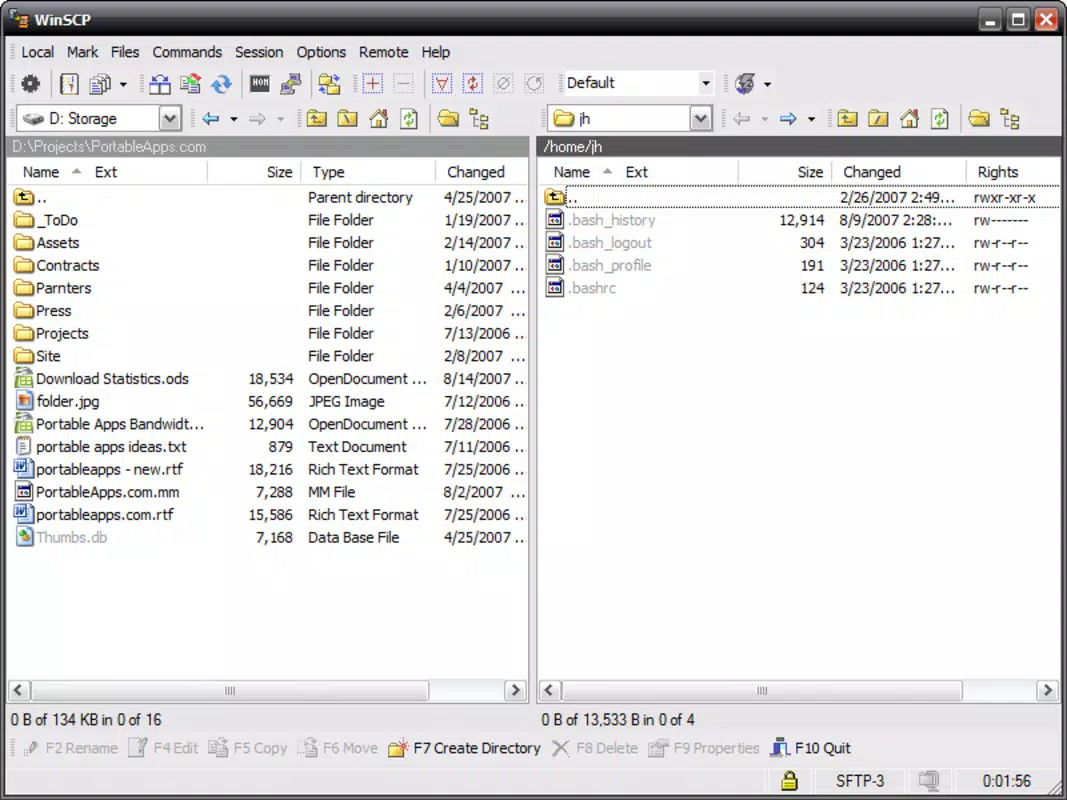
- Two Interface Modes: Users can switch between Norton Commander (dual-panel layout) and Explorer (single-panel, file-browser style), allowing customization based on workflow preferences and familiarity.
- Drag-and-Drop File Management: Enables intuitive file transfers between local and remote directories, reducing the need for complex command-line operations and improving efficiency.
- Portability Across Devices: The app runs directly from a USB drive or portable storage, preserving user settings, saved sessions, and transfer history across different systems without installation.
- Full-Featured FTP Client: Offers comprehensive tools for file browsing, synchronization, scripting, and session management, supporting both novice users and advanced technical workflows.
For example, a developer working on a project across multiple computers can use WinSCP Portable to maintain a consistent environment. They can transfer updated code files from their laptop to a staging server, synchronize directories between environments, and resume work on another machine using the same settings—all without reinstalling or reconfiguring.
Interface, UX & Performance
The user interface of WinSCP Portable is designed with functionality and usability in mind. It presents a clean, organized layout that supports both dual-panel and single-panel navigation, catering to different user preferences. The Norton Commander style enables side-by-side comparison and transfer of files between local and remote systems, while the Explorer mode offers a more familiar, hierarchical file browser experience.
Navigation is straightforward, with clearly labeled sections for local and remote directories, transfer queues, and session management. The drag-and-drop functionality enhances usability, allowing users to move files with minimal effort. Although the developer did not list formal performance metrics, the app is optimized for responsive interaction, with quick load times and stable operation during file transfers.
Performance across device categories is expected to be consistent, given the app’s lightweight nature and reliance on standard protocols. Users should experience smooth operation on mid-to-high-end smartphones and tablets, though performance may vary on older or less powerful hardware. Stability during long-running transfers and session persistence are key strengths, ensuring uninterrupted workflows.
Platform Compatibility & Technical Requirements
WinSCP Portable is available for Android and iOS platforms. The app supports the latest versions of both operating systems, ensuring compatibility with current device hardware and software standards. The file size is approximately 28.5 MB, making it suitable for devices with limited storage capacity.
Although the developer did not specify minimum OS requirements, the app is designed to function efficiently on modern smartphones and tablets. Users are advised to ensure their device meets the general system requirements for running secure network applications. Compatibility with various SSH servers and remote hosts is supported, though specific configuration may be required based on server settings.
Pros and Cons
Pros
- Secure file transfers using SFTP and SCP protocols
- Portable version allows use across multiple devices without installation
- Supports dual interface styles for personalized workflow
- Intuitive drag-and-drop file management
- Lightweight and efficient, suitable for mobile use
Cons
- Specific system requirements were not listed
- Advanced features may require technical knowledge to configure
- Limited visual customization options beyond interface layout
- Developer did not provide detailed performance benchmarks
- May require manual setup for certain server configurations
FAQ
Is WinSCP Portable safe to use on mobile devices?
Yes, WinSCP Portable uses encrypted protocols like SFTP and SCP to protect data during transfer. As long as the server is properly configured, file transmission remains secure.
Can I use WinSCP Portable without installing it on my device?
Yes, the portable version is designed to run directly from a USB drive or other portable storage, eliminating the need for installation on the host device.
Does WinSCP Portable support both Android and iOS?
Yes, the app is available for both Android and iOS platforms, allowing users to access secure file transfer capabilities across different mobile ecosystems.
How do I update WinSCP Portable?
Users should check the official developer page or app store for the latest version. Updates are recommended to ensure security patches and improved functionality.
Can I transfer large files using WinSCP Portable?
Yes, the app supports large file transfers, though performance may depend on network speed and device capabilities. Long transfers are stable and resumeable.
Final Thoughts
WinSCP Portable stands out as a dependable, secure, and portable solution for managing file transfers on mobile devices. Its dual interface options, robust encryption, and ability to operate without installation make it a powerful tool for technical users who need flexibility and consistency across systems. While it may require some initial setup for advanced configurations, its intuitive design ensures accessibility for a wide range of users.
For developers, system administrators, and IT professionals, this app delivers a high-value utility that enhances productivity and security in remote file management. The combination of portability, reliability, and strong encryption makes it a top choice in its category.
Download WinSCP Portable now


